
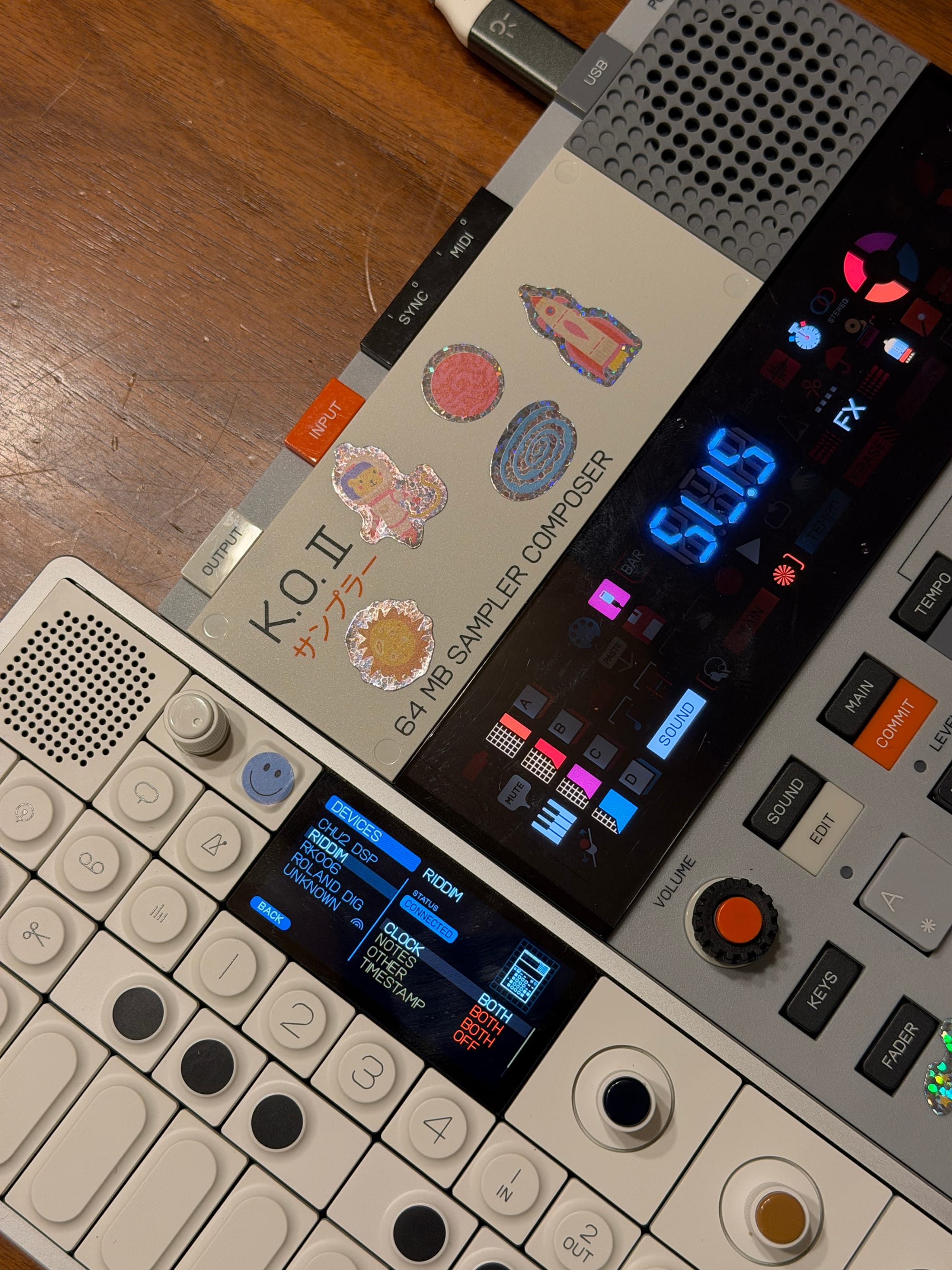
Teenage Engineering sells the EP-133 and the EP-40, two awesome instruments with a lot of crossover similarities. After a little exploring, I found out that the only thing preventing one from running the firmware of the other is a four-byte field in the firmware file's header.
How it started
The EP-133 (k.o. II) and the EP-40 (riddim) share a lot of the same features. They have the same body, same screen, same pads. But the newer riddim ships with some unique features like looping, multisample, and the Supertone synth engine. These sounded like really cool features to me, and I was curious what it'd be like to play with them.
I own an EP-133 and, looking at it recently, I wondered if it could just... run the device's other firmware. Turns out, yeah, and it's actually not too complicated. Teenage Engineering, who after I shared this information with them asked that I communicate warnings about how this is unsupported and would void your unit's warranty, hands people pretty much all the tools they'd need to figure this out, too. Just had to figure out where to look.
Reviewing the firmware files
TE hosts a public updater at teenage.engineering/apps/update. It runs entirely in the browser and talks to the device over USB, which means you can watch how it works using DevTools.
I opened the tool without my EP-133 plugged in, switched to Network, and reloaded. One request stood out: a GET for releases.json. That's the firmware catalog, listing products by SKU, each with an fw_url ending in .tfw.
{
  "devices": [
    {
      "sku": "TE032AS001",        // EP-133 k.o. II
      "version": "2.5.1",
      "fw_url": "/_software/ep-133/ep-133_firmware_2_5_1.tfw"
    },
    {
      "sku": "TE032AS006",        // EP-40 riddim
      "version": "2.5.1",
      "fw_url": "/_software/ep-40/ep-40_firmware_2_5_1.tfw"
    }
  ]
}
https://teenage.engineering/_software/releases.json.
Maps each SKU to a fw_url. The two I used:
…/ep-133_firmware_2_5_1.tfw
(TE032AS001) and
…/ep-40_firmware_2_5_1.tfw
(TE032AS006), both 2.5.1.
Two files stood out, both at version 2.5.1 and available to download without requiring an account or connected device.
Exploring TE's update tool
I plugged the EP-133 in, opened the page, allowed WebMIDI with sysex. It found the device and showed the normal card: serial, OS, SKU, etc.
Updating firmware, unfortunately, doesn't natively ask you to provide a file. However, watching Network showed the page fetches releases.json on load, and when you hit Update it downloads whichever package in that json matches the SKU of the thing you plugged in.
The tool also loads a lot of easily viewable code to the user's browser.
Reading the page's own JavaScript
Same Network panel, the app's main script for me was titled index-CFniztty.js (filename post index- is content-hashed and will change per person) and comes in at about 625 KB. I downloaded and ran rg over it.
# file: teenage.engineering/apps/update/assets/index-CFniztty.js
fetch("/_software/releases.json")                    # ~byte 620406
const s=t||this.props.fw.fw_url                      # ~byte 598408
firmware not compatible with this device              # ~byte 599860
index-CFniztty.js.
The Update path is the short one. upgradeDevice hands their DFU perform either a dropped file or, normally, this.props.fw.fw_url straight from the catalog:
// Source: /apps/update/assets/index-CFniztty.js  (search: "upgradeDevice")
// Minified; line breaks added only for reading.
async upgradeDevice(t=!1){
  const r=t?this.state.dropFW.version:this.props.fw.version;
  …
  const s=t||this.props.fw.fw_url;
  …
  await src_default.perform(this.props.device.serial,s,this.onProgress);
}
fw_url the catalog gave for the connected SKU.
Turns out there is a firmware drop path! The dropHandler function parses a dropped .tfw, pulls a SKU out of the file, compares it to the connected device's SKU, and on mismatch does this:
// Source: /apps/update/assets/index-CFniztty.js  (search: "firmware not compatible")
// Minified; line breaks added only for reading.
o===this.props.device.metadata.sku||h
  ? this.setState({dropFW:{file:s,sku:o,version:a}})
  : (
      captureMessage(
        `firmware ${s.name} for sku ${o} not compatible with device sku=${this.props.device.metadata.sku} version=${a}`
      ),
      this.setState({
        fileError:"firmware not compatible with this device",
        dropFW:null
      }),
      setTimeout(()=>{this.setState({fileError:null})}, this.errorTimer)
    )
firmware not compatible with this device.
That's the gate that I'd been looking for: o===this.props.device.metadata.sku. This is just a string comparison that runs locally in the user's browser. Easy enough to manipulate those strings!
Next up was figuring out what that SKU field inside the .tfw represents, and whether or not the device takes a package whose header says one thing and whose body comes from the other product.
babecafe
In the same file, to view this part search not a valid firmware file:
// Source: /apps/update/assets/index-CFniztty.js  (search: "not a valid firmware file")
// Also: this.sku=[e[15],e[16],e[17],e[18]]  ~byte 485248
if (e[0]!=186||e[1]!=190||e[2]!=202||e[3]!=254)
  throw new Error("not a valid firmware file");
this.firmware_type=e[4];
this.checksum=[e[5],e[6]];
this.version=[e[7],e[8],e[9],e[10],e[11],e[12],e[13],e[14]];
this.sku=[e[15],e[16],e[17],e[18]];
Those first four bytes - 186, 190, 202, 254 - are a "magic number" which means they're a fixed marker at the top of a file that helps programs know what they're looking at. PDFs start with %PDF, ZIPs start with PK, and Teenage Engineering firmware files start with ba be ca fe.
I'm not the first person to come across at this header. There's a long-running OP Forums thread about custom OP-1 firmware where people comparing .tfw files across TE products already had most of it mapped:
"It looks similar (if not the same) format as the OP-1 field firmware. Bytes 8-13 are the firmware version number (in hex). There is some other metadata in the babecafe header that I haven't quite figured out, but I'm assuming there is some kind of product code in there as well."OP Forums · Custom Firmware on the OP-1 · page 44
Finding the difference that enables cross-flashing
After that I opened both the EP-133 and EP-40 2.5.1 firmware files in xxd.
00000000: babe cafe 0087 8200 0200 0500 0100 0000
00000010: 0800 0100 0000 0000 0000 0000 0000 0000
00000020: 0000 0000 0000 0000 0000 0000 0000 0000
00000030: 0000 0000 0000 0000 0000 0000 0000 0000
00000000: babe cafe 0032 3400 0200 0500 0100 0000
00000010: 0800 0600 0000 0000 0000 0000 0000 0000
00000020: 0000 0000 0000 0000 0000 0000 0000 0000
00000030: 0000 0000 0000 0000 0000 0000 0000 0000
Two things differ. A checksum-ish field around bytes 5-6, and four bytes at 15-18: 00 08 00 01 and 00 08 00 06.
There was a clue about which changed bytes matter within parser, which reads 15–18 as the SKU and compares those. The other differing bytes, near offset 5, I believe are for file integrity and aren't something I've explored further than recognizing them. [update]
# the four SKU bytes (offsets 15-18)   ->   the published product code
ep-133   00 08 00 01   ->   TE032AS001
ep-40    00 08 00 06   ->   TE032AS006

# same codes listed in releases.json and on the download pages
getSkuString() in index-CFniztty.js (~byte 485790).
The bundle ships getSkuString(), which turns those four bytes into the exact TE032AS00x string the UI and releases.json already use.
Flashing myself
The stock update tool follows the catalog URL. The drop path checks the SKU. Those were great clues, but TE's tool wasn't natively going to help me cross-flash, even though I now knew exactly which bytes to change. So, I had to figure out the DFU sequence the updater tool implements.
Thankfully it was pretty easy to observe - their tool runs over USB MIDI SysEx via WebMIDI, which the page requests as navigator.requestMIDIAccess({sysex:!0}). The command numbers are sitting in the bundle as an object literal:
# ~byte 486591 in index-CFniztty.js
TE_SYSEX_DFU={DFU:3,DFU_ENTER:1,DFU_ENTER_MIDI:1,DFU_BEGIN:2,DFU_BEGIN_APP:176,DFU_CHUNK:3,DFU_PERFORM:4,DFU_EXIT:5,BAD_REQUEST:127,DFU_ENTER_RESPONSE_READY:64}
packToBuffer / unpackInPlace (~bytes 463508–463698) do the 7-bit MIDI packing.
The sequence, implemented in perform (search async perform(e,t,r)), reads as a timeline:
- DFU_ENTER. Ask the device to enter update mode and wait for it to say it's ready.
- DFU_BEGIN. Announce the incoming image: version, the four SKU bytes, total size, firmware type. This is where the SKU is stated on the wire.
- DFU_CHUNK, repeated. Send the body in pieces from byte 64 onward, waiting for an ack each time.
- DFU_PERFORM. Commit.
- DFU_EXIT. Leave update mode. The device reboots into the new firmware.
One practical wrinkle: SysEx data bytes are only 7-bit clean, so 8-bit firmware bytes get repacked. This is the same Packed7 scheme that the TE enthusiast community's sample tools already document.
For confirmation, I also noticed that user wmealing has published bring-up capture notes and KO2-SYSEX doing exactly this with a MIDI monitor, which lines up with what the page's own code describes.
Four bytes
I copied the official EP-40 2.5.1 package and changed four bytes at offsets 15–18. 00 08 00 06 → 00 08 00 01. A lot of buildup for a small change. No need to perform any decryption, and no need to dive deeper into patching the body of the firmware file.
Then I sent it over with the begin / chunk / perform / exit sequence above as I crossed my fingers and hoped for the best.
My 64MB EP-133 unit then rebooted as an EP-40! I'd been concerned it wouldn't take - the EP-40 units only ship with 128MB of sample storage, and I thought this might be a showstopping hardware difference. That concern turned out to be not a big deal at all. (So far, in my testing, at least.)
inputs:  ['EP-40']
outputs: ['EP-40']
# identity reply (mido strips F0/F7):
7e 3c 06 02 00 20 76 20 00 06 00 00 00 00 00
#              ^^^^^ TE mfg     ^^^^^ → TE032AS006
TE032AS006.
Decode with TE's own format_te_sku / parseMidiIdentityResponse, or with
mido.
USB MIDI enumerates as EP-40. Universal identity comes back TE032AS006. GREET still reports the same serial it always has - the serial is the hardware anchor and it doesn't move. Loop, multisample and Supertone all behave like Riddim.
Getting Medieval?
Of course my next question was whether or not this trick would apply to the EP-1320 Medieval as well.
Offline, both EP-40 and EP-133 2.5.1 files parse as a babecafe wrapper around an MCUboot image with IMAGE_F_ENCRYPTED_AES128. The payload is ciphertext. The session AES key is wrapped with ENC_EC256 (ECIES-P256). EP-133 and EP-40 share a KEYHASH - d349a2d4… - one device encryption public key for the family. Each image still carries its own wrapped session key, so you can't decrypt one blob using the other file.
The updater never decrypts anything on the host. It streams from offset 64. There's no read-back. PERFORM returning 0 means the bytes arrived, not that the bootloader liked them.
EP-1320 Medieval 1.5.0 uses the same packaging and a different KEYHASH (40e5051c…). I tried this several times - with the SKU rewritten to EP-40, and with my actual hardware SKU. Both times DFU looked perfectly happy on the wire. Both times the screen sat on RDY and GREET reported mode:bootloader.
Soft rejects every time, but thankfully this testing didn't brick my device. Flashing a stock same-family .tfw from bootloader brings it back. However, this appears to be a real boundary. The SKU byte is a host-side label. The KEYHASH is device crypto, which is way more robust. Rewriting the label gets you across products that share a key and nowhere at all across families that don't.
NOTE: I do not own an EP-1320 Medieval and was not able to test further. If you do and find a way to get around this restriction, please let me know!
Responsible disclosure
It's worth stating clearly that nobody got "owned" through this effort. There was no compromise of any server, nor abuse of any account. This worked by inspecting a tool that loads its code into a user's browser, downloading files from TE's public CDN, and modifying four bytes of hex.
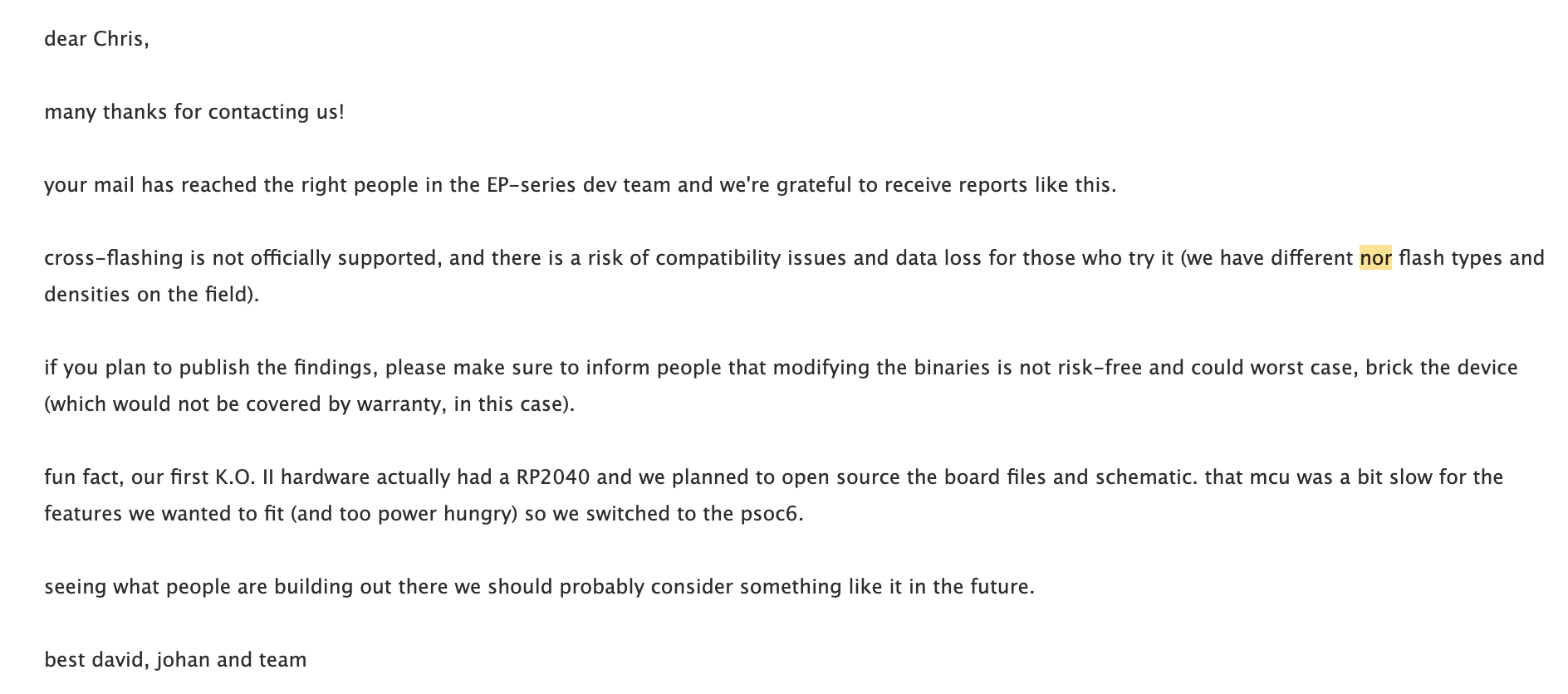
I followed a responsible disclosure process with Teenage Engineering to share that I learned and this was their reply:
ep-unity
The companion tool to this effort is ep-unity. It rewrites the babecafe SKU to match whatever's connected, flashes over WebMIDI DFU, backs up and restores projects and samples, thins factory .paks so you don't fill a 64 MiB part by trying out riddim presets on your older model EP-133, and watches for bootloader / err sound states after a transfer. It links TE firmware URLs from releases.json but doesn't host TE's updater or any .tfw / .pak binaries.
The tool is at ep-unity.linecross.ing, the source is on GitHub,
A few ways I saw things go wrong
Four things went wrong with the filesystem (not the firmware itself) over the course of my testing.
| What I saw | What it was | What fixed it |
|---|---|---|
Screen stuck on RDY, GREET says mode:bootloader | Wrong-family image, rejected after transfer | Flash a stock same-family .tfw from bootloader |
ERR SoUnD 44 2_0_5 spamming ~1/sec | New sound store under old OS | SHIFT+ERASE format boot, then flash |
err sound 24 2_5_1 after a KO flash | Riddim projects with Supertone pads still on NOR | Same: SHIFT+ERASE, then restore what you need |
ERR SYSTEM_MODEL 58 2_5_1, intermittent | Restore too big for free space | Check free space first, thin the .pak |
ERR SoUnD: the OS downgrade trap
Same-family downgrade is allowed. 2.5.1 → 2.0.5 booted fine on this unit.
What didn't survive was the sound store. With a newer sound store under an older OS, the device started spamming firmware debug SysEx about once a second, screen text along the lines of ERR SoUnD 44 2_0_5, and stopped answering identity / GREET / DFU usefully.
The fix:
- Power off.
- Hold SHIFT+ERASE, power on. This formats the sound store.
- Flash the OS you actually want.
- Restore projects from a
.pakbackup afterwards.
The same class of thing showed up later as err sound 24 2_5_1 after flashing EP-133 firmware while Riddim projects with Supertone pads were still sitting on NOR - Riddim stores those as high pad symbols and KO's firmware doesn't want them. Before a KO flash, scan on-device projects for Supertone pads and strip or erase first.
Fitting riddim's factory projects into 64 MB
My EP-133 is one of the original run, with 64 MB of NOR flash for samples. The riddim units ship with 128 MB.
At first I was concerned this would be a blocker in cross-flashing, but the 2.5.1 packages are nearly the same size and this unit boots riddim's firmware happily. Next, I went about exploring how to sideload the factory demos. Turns out they don't live inside the .tfw at all. They live in Sample Tool .pak archives, and a full riddim factory bank is about ~86 MB of WAV.
Thankfully there was a helpful change in the 2.5.x firmwares: the device now can store each sample at its own rate instead of upsampling everything to 46875 Hz. A 22 kHz one-shot stays 22 kHz rather than doubling in size on the way in, and so on. When retaining sample rates, all nine EP-40 factory projects land around 52 MB, which, if you leave out the non-demo samples, fits onto 64MB EP-133s with a little room left over.
To make it easier to test this out, I build this functionality into the ep-unity tool. It links you to the factory project files on TE's website to download, and when you reupload them for processing it keeps everything at its native sample rate.
Unresolved: Some MIDI weirdness
On the cross-flashed unit I've seen very occasional glitches and freezes on the riddim firmware, particularly when driving it hard over MIDI. However, I've seen a few people report hangs on factory riddims too though, on unmodified hardware, so maybe this is related to something else.
My casual use of the riddim features has been fine so far on this EP-133, but the standard caveat remains that this cross-flashing exercise is not recommended or endorsed by myself or TE.
Don't try this, but if you do:
- Steel yourself. Just because I haven't bricked mine doesn't mean it won't brick yours. If you're not ready for that possibility, don't proceed.
- Back everything up first. Projects, samples, anything you don't want to risk.
- Write down your serial number after ep-unity gives it to you. When flashing, GREET reports
the unit’s serialno matter which product the unit currently thinks it is. That's your anchor in case you decide to venture into further exploration. - Being met with the bootloader doesn't necessarily mean your unit is bricked. If you can still get to GREET, you can probably still flash a stock same-family
.tfwand get back to prior working order. This worked for me several times, but again, your mileage may very well vary. - My serious failure points primarily came from problems in the filesystem. Be ready to reach for the SHIFT+ERASE system wipe shortcut if you feel like you're pretty stick.
- I didn't try this with my 64MB of sample storage completely full. Maybe it'd be fine, but to be on the safe side it's probably best to make sure you have at least a little bit of free space.
Disclosure
Responsible disclosure of the client-side SKU gate went to Teenage Engineering before any of this was public. Their EP-series team's response was the NOR density warning at the top.
Sources
TE's update page; /apps/update/assets/index-CFniztty.js; /_software/releases.json; the OP Forums TE firmware header discussion; wmealing's KO2-EP-133 SysEx notes and KO2-SYSEX; ep133-krate and ep133-ppak for Packed7 and protocol documentation; ep133-export-to-daw. Firmware files and TE's updater app are not redistributed here.
Updates
Things learned after publishing. The body above is left as written; corrections and additions live here.
7 August 2026 - the header checksum was identified!
Above I set the two differing bytes near offset 5 aside as file integrity, “a different job,” without answering the obvious follow-up: if I edited the file, why didn’t that checksum notice?
Charles Vestal read this, independently reverse-engineered the same container, and figured it out. Those bytes are a CRC-16/XMODEM over everything from offset 0x40 to the end of the file. He verified this against every current firmware release. I validated that myself, and it matches.
This explains a lot. The SKU at bytes 15–18 sits before 0x40, outside the range the checksum covers. Rewriting it can't invalidate anything, because the checksum was never looking at those bytes.
The same work turned up something else I’d missed - the beefcafe header further into the file mirrors the SKU at offset 0x57. I never touched it, so the image I flashed claims to be an EP-133 on the outside and an EP-40 on the inside. Every stock file has the two spots agreeing. My initial version of the ep-unity tool didn't do both which was fine because the device booted it anyway - that second copy isn’t checked, at least not on this path. The gate really was one field, but that could change in the future and it's good to be consistent / resilient. Thanks, Charles!
His change is merged into ep-unity, which now reports whether both checksums verify.